AI Christmas Video Generator
Put yourself in the Christmas video everyone is posting. Open the Christmas template below, add your photos and get your own AI video. We add more Christmas templates as the season's trends take off.
Start making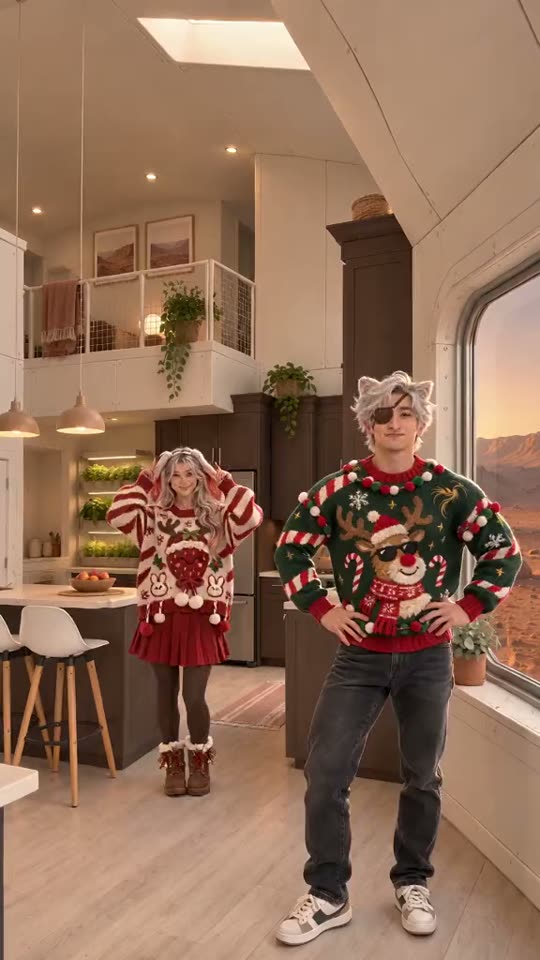
The Christmas template
| Template | Photos | Length | Format | Start |
|---|---|---|---|---|
| Christmas Dance AI Christmas duo dance · 2 photos | 2–3 | 15s | 9:16 | Make mine → |
One full video costs 50 credits; packs start at $9.99, one-time, no subscription. There is no free preview.
Make your video on this page
Pick a template, add your photo and pay once ($9.99 for one full video, no subscription). Nothing to install and no free preview.
More templates coming soon
- 2 photos
- 15s
- Audio included
- 50 credits
Photo tips · JPG / PNG / WEBP, up to 10 MB
- ✓One person per photo, facing the camera
- ✓Face clear and well lit — no sunglasses, hats or hands over it
- ✓Show the outfit: a photo from the head to the waist or knees
- ✓No mirror selfies or phone in hand — it can show up in your video
🎵 Audio is included in the video. Tap the speaker icon to turn sound on or off.
50 credits · packs from $9.99, one-time, no subscription
- Failed videos refunded automatically
- Photos deleted after 30 days
- Secure checkout by Stripe
Automatic refund if it fails. Not happy with the quality? Email support@remixthetrend.com and we'll look into it; if we confirm a quality problem, you get a refund. Refund Policy
Finished clips are kept for 90 days: download yours when it's ready. Pricing
Which Christmas template should you pick?
Right now there is one: Christmas Dance AI, the duo dance from the TikTok Christmas pajama reel. It takes two photos, one adult each, makes a 15-second 9:16 video with sound, and lets you dance in the original kitchen, the Mars kitchen or a room photo of your own. We add more Christmas templates as they take off, so check back.
Original kitchen, Mars kitchen or your own room
Christmas Dance AI has three settings. The default is the original kitchen from the TikTok reel. One tap switches to the Mars kitchen. Or add a third photo of your own room: an empty room works best, because furniture in the photo can get in the dancers' way. Whichever setting you choose, the dance, the camera and the timing come from the reference clip. Your photos only decide who is dancing and where.
Photos that work for the pajama duo dance
Use one adult per photo, as JPG, PNG or WebP up to 10 MB. Both faces should be fully visible, looking at the camera, in even light. Full-body photos give the dancers the most to work with. Avoid sunglasses, heavy filters and photos where the person is tiny or cropped. It works for a Christmas dance with mom, a friend or a partner, as long as both people agreed to appear. Photos of strangers or minors are not allowed.
Length, format and sound
The video is 15 seconds long and vertical 9:16, so it fits Reels, Shorts and TikTok without cropping. It is generated with sound that follows the reference clip, but audio can vary between runs. Play it before you post, and follow the music rules of the platform you publish on.
How long it takes, and what happens if it fails
A video usually takes a few minutes, and up to about ten. If a generation fails, the credits are refunded automatically. Your photos are deleted after 30 days, and finished videos stay in My videos for 90 days, so download the one you want to keep.
Why use a template instead of a general AI video tool
A general text-to-video tool needs a long prompt and several retries to get one specific dance. Here the choreography, camera and timing are already fixed by the trend clip, so all you choose is the people. You also pay once per video, with no subscription, and you see the price before you generate.
Ways to use it
Post it as your family's holiday card, send it to a friend in another city, or drop it in a group chat as a greeting. It is a short clip made for sharing, so the first seconds should show both faces clearly. Make a second one with different photos if the first is not quite right.
How to make your video
- 1Pick a template. Open one from the cards or table above and watch its example.
- 2Upload your photo. Use a clear, front-facing photo of an adult who agreed to appear. Templates for more than one person ask for one photo each.
- 3Generate and download. When the video is ready, download it and post it.
What it costs
A full video costs 50 credits on every template, and credit packs start at $9.99; pack credits never expire. A monthly plan is also available. There is no free preview.
Questions
How does an AI Christmas video generator work?+
You pick a Christmas template, upload photos of yourself (or of adults who agreed), and Remix the Trend puts those people into the video from the reference clip. You download the finished video and post it.
How many photos do I need?+
It depends on the template. Christmas Dance AI needs two photos, one adult each, plus an optional photo of a room. The table above lists it for every template.
Is it free?+
No. There is no free version: a full video costs 50 credits, with packs from $9.99, one-time and no subscription.
Can I use my own room as the background?+
Yes, on Christmas Dance AI: add a photo of a room (an empty room works best) as the optional third photo, or tap the Mars kitchen. Skip it to dance in the original kitchen.
Which photos work best?+
Sharp, well-lit photos with the whole face visible, looking at the camera; full-body photos work best for dances. Avoid sunglasses, heavy filters and photos where the person is tiny or cropped. Use only your own photos or an adult's photo with permission.